📱 Rotate to landscape for the full deck experience — most slides are designed wide.
🔒 COHORT 01 · INVITED ONLY
TMFA System Tour
Password is in the WhatsApp group.
tap the link in WhatsApp · password unlocks the deck
TMFA SYSTEM TOUR · COHORT 01 · MAY 1 2026
Your Vault. Your Archive. Your Future.
A working tour of the personal intelligence system — open-source, MIT, free forever. Then how the cohort turns it into one shipped artifact, and the Studio becomes your first paying customer.
👋 QUICK INTROS
Name. Where you're calling in from. One thing you want to automate.
~20 seconds each. I'll popcorn — you call the next person. Builds on what you wrote in WhatsApp; calibrates the room to who's here.
🎯 WHAT YOU MIGHT SHIP · A PREVIEW
Hypotheses based on your intros so far.
Working from your WhatsApp posts, not deep knowledge of your archive. Push back live if any feel off — we'll refine in week 1.
Pat Monahan · San Diego — apparel/branding studio
Vault learns: client-segment patterns from past brand work · Ships: brand-brief or merch-deck generator the Studio could use for our own brands.
Jonathan Beaton · Montreal/LA — showrunner/producer
Vault learns: pitch-deck patterns + research clusters · Ships: auto-generated TV pitch deck from concept-art + script archive.
Andrea Zeman · San Diego — realtor / broker
Vault learns: client touchpoint cadence + neighborhood expertise from a decade of transactions · Ships: realtor touchpoint engine — auto-emails, listing inputs, market-research briefings.
Peter Walters · Fairfax CA — yoga teacher + vibe coder
Already ingested: ChatGPT, photos, emails, texts, articles, podcasts, 1,000+ class transcripts, parents' oral histories · Ships: daily yoga app driven by his class archive.
Kevin Losani · NYC — documentary post-production
Already running on 60TB of TMFA doc footage as asst-editor / producer / researcher · Ships: storyline-discovery tool — finds the most impactful version of a long-form story.
Nate Uyeda · rural Argentina — creator/builder/spacemaker
Vault learns: build-process patterns from Art City + offgrid systems knowledge · Ships: place-build framework — repeatable docs for "make a place from scratch."
Barry Silver · SF — artist + former yoga teacher
Vault learns: themes across years of conceptual projects · Ships: autobiographical performance script — the long-form piece he's been carrying for years.
Molly Rose · somatic depth coach + experience designer
Vault learns: synthesis across somatics, social impact, transpersonal threads · Ships: coaching launch package — site copy + 3 essays positioning her practice.
Jackson Skaggs · LA — analytics, side projects
Vault learns: cross-references across scattered side-project notes · Ships: AI-assisted research tool for his own use — the thing he sells back to the Studio.
David Brits · Cape Town — murals + sign-writing co + sculptor
Vault learns: 15-year artistic archive patterns + business workflow gaps · Ships: second-brain dashboard across the artistic + business sides of the practice.
TODAY'S 60 MINUTES
01The vault — a tour of mine12 min
02How you wire Claude into it6 min
03How sources get in10 min
04When you get stuck (setup week)6 min
05The cohort — schedule, WhatsApp, economics10 min
Bring receipts to WhatsApp. Workflow you want automated? Drop it in the group, I'll make it a future demo.
Build in public. #cohort01 in WhatsApp when you ship anything in May.
Shitty first drafts welcome. Rough is fine. Honest is required.
Feedback is a gift. Both directions.
FYI: this course was designed by AI, fed Matty's library of past projects + frameworks (including the Maven course-creator workshop he took in 2022). He took a course, shipped it to canon, asked the system to design a course, and here we are. This recursion is the recurring theme — you'll do it too.
🌊 SWIMOLOGY
A boatman, a professor, a sinking ship.
A professor boards a boat with a simple boatman. As they row, the professor boasts about his studies — geology, oceanology, meteorology — and tells the boatman he's "wasted a quarter of his life" for not knowing each subject.
Then a storm hits. The boat starts to sink.
The boatman turns to him: "Professor — have you studied swimology?"
The professor admits he never learned to swim.
"Then you've wasted all of it. The ship is sinking. You'll drown."
— S.N. Goenka, Vipassana
Today's professors study AI hot takes, prompt-engineering threads, framework decks — but they don't use the tools on their own work.
The ship is sinking now. The creators who learn to swim will. The ones who only read about water will not.
Swimology = butt in chair, hands on keys, ingesting your own data, building your own tools, saving yourself.
This week is a swimming lesson. Not a lecture. Don't read. Run.
🧠 WHY THIS MATTERS
Wrapper around a prompt. vs. Wrapper around your archive.
WHAT MOST AI TOOLS DO
👤 You→prompt→🤖 LLM→output
The model leans on the whole internet's average voice. Output sounds like ChatGPT — because it is.
WHAT THIS DOES — KARPATHY'S "LLM WIKI"
👤 You→ask→🤖 LLM↻📁 Your vault→output
The model reads your archive before responding. Output sounds like you because it is you.
What's an "LLM Wiki"? Andrej Karpathy's pattern: instead of fine-tuning a model on your data (slow, expensive, leaks), you maintain an external Markdown archive the model reads on every request. The vault is the wiki. Claude is the reader. You stay in control of the source of truth.
🏗️ HOW IT WORKS
Four layers. Each one feeds the next.
01 · SOURCESRaw, untouched material — journals, articles, transcripts, voice memos, photos, emails. Never modified.
▲ extracted into
02 · SOURCE NOTESYour processing of those sources. First layer where interpretation enters.
▲ synthesized into
03 · CANONDurable, synthesized pages. Every person, place, theme, project gets a page that grows over time.
The system learns your voice, your relationships, your lived chronology.
The system needs to know who you are before it can serve what you do. Skip the foundation and your bio reads like a LinkedIn profile. Build it first and your bio sounds like you wrote it on your best day. Same for memos, decks, talks, marketing copy — everything downstream.
🎯 WHAT IT PRODUCES — RECENT MONTH
Real outputs from this system. Last 30 days.
📜 TED Talk — 18-min draft + reveal.js deck, grounded in 12 years of historical work
🔬 Autoresearch synthesis — 17 loan instruments, hobo-code design language
⚖️ Council pressure-tests — real decisions stress-tested by 12 personas
📰 ~12 Substack drafts — first-pass writing from canon
Plus custom skills: /commercialize, /autoresearch, /mentor, /harvest, /substack-reply, /research-ideas. Each one composes outputs from canon.
01 / 06
🗂️ The Vault.
A tour of mine. Same scaffolding you have, but loaded with twenty years of work.
THE STRUCTURE
Numbered folders. Top to bottom is the journey of any piece of information.
00_HOME — hub pages I navigate from. The map.
01_INBOX — drop zone. Stuff lands here, I process later.
02_SOURCES — raw material. Immutable.
03_SOURCE_NOTES — my processing of those sources.
04_CANON — durable knowledge. The wiki layer.
05_PROJECTS — active, archived, dormant.
06_OUTPUTS — what I make. Bios, memos, decks, websites.
08_RESEARCH — external topics, vault-aware.
09_IDEAS — half-formed. The lab.
10_META — the rules.
THE NUMBERS
This is not a hypothetical demo.
463
source files
1,246
canon pages
197
output artifacts
271
meeting transcripts
1,030
contacts mapped
626
collectors reconstructed
Twenty years of creative practice — fully searchable, cross-linked, synthesizable by an LLM that runs on your laptop.
A REAL PAGE
Three things to notice.
Frontmatter at the top — type, status, last_updated. The system knows what kind of page this is.
Wikilinks throughout — every [[bracketed]] term is a clickable jump. Cmd-click and you land on that page.
Source citations — every claim has a footnote pointing back to where it came from. Nothing in canon is unsourced.
HUB PAGES — MINE
Where I start when I don't know where to start.
00_HOME/Studio.md — active projects, business entities, network
00_HOME/TMFA.md — the artist practice — works, themes, frameworks
00_HOME/Personal.md — practice, identity, family
00_HOME/Index.md — every recently-added page
00_HOME/Log.md — what I did, dated, append-only
Yours will look different. Hub pages aren't shipped templates — they're your domains. Pat's might be Brand.md / Clients.md / Studio.md. Andrea's might be Listings.md / Buyers.md / Neighborhoods.md. Jonathan's might be Shows.md / Pitches.md / Research.md. Claude helps you pick yours during personalization.
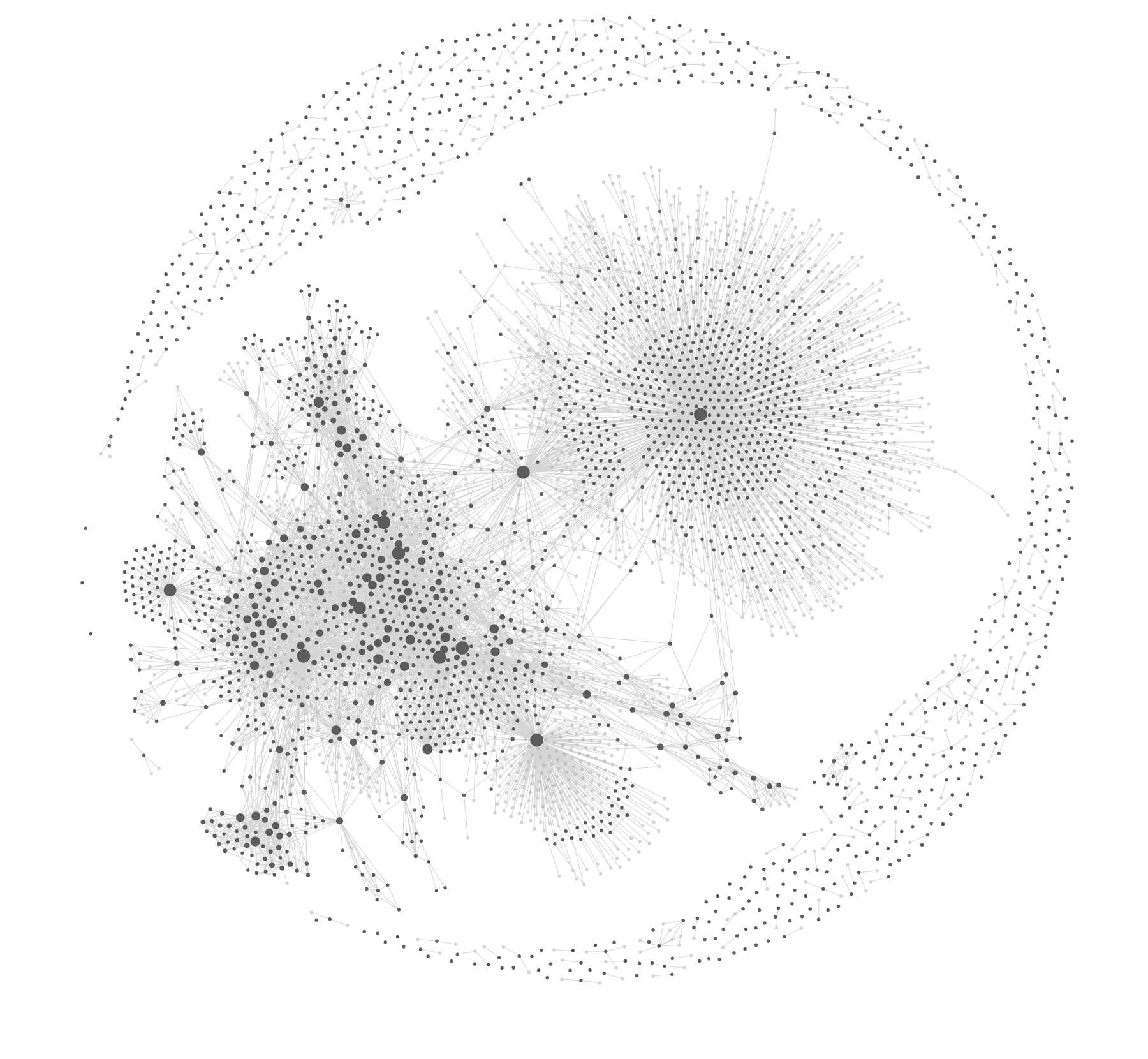
🌌 GRAPH VIEW · CMD+G
The whole vault, as a constellation.
Dense clusters — what you think about most.
Big sunbursts — hub pages with hundreds of wikilinks radiating outward.
Outer ring — orphans + stubs that need work. The system tells on itself.
Bridges between clusters — where unexpected connections live. /connect lives here.
A real screenshot of my vault — ~2,000 nodes. Each dot is a page, each line a wikilink. Two weeks in, yours has its own shape.
02 / 06
🤖 Connecting Claude.
Three commands. Five minutes. The vault becomes alive.
STEP 1 · INSTALL CLAUDE CODE
Download the desktop app.
Go to claude.ai/claude-code → download for your OS → sign in with your Anthropic account.
The free tier covers everything we'll do this week. Pro tier (~$20/mo) once you're loaded up.
No terminal required. No install scripts. The desktop app handles everything.
STEP 2 · POINT IT AT YOUR VAULT
Open Claude Code → choose your vault folder.
Same way you'd open a project in any editor. Claude reads CLAUDE.md at the top of your vault and sees this is a fresh install.
From here on, everything happens in Claude Code. If you need to run a script, install something, move files — just ask Claude. It runs the terminal commands for you.
STEP 3 · TYPE TWO WORDS
let's go
Claude walks you through personalization — your name, your practice, your domains. Two minutes.
Then ask Claude anything: "set up git on this vault" · "install the photo processor dependencies" · "ingest my journal entry." It'll do all the terminal work in the background.
🤲 BUILT FOR NON-CODERS
Four operations. That's the whole interface.
📁
Connect a folder.
Open Claude Code. Point it at your vault. Done.
📥
Drop files in.
Drag a journal, a press article, a meeting note into your inbox folder.
💬
Ask what to do next.
"What should I work on this morning?" · "Process my inbox."
❓
Ask any question.
"What's a canon page again?" · "Why did you put that there?"
If you can use Dropbox and text someone, you can run this. No terminal. No code. No memorizing commands. Claude handles every script, install, file move, and lookup in the background — you just talk to it.
14 SKILLS — JUST ASK FOR ANY OF THEM
You don't need the slash. Plain English works.
/ingest — process a source
/diarize — build a canon page
/enrich — fill out a stub
/vault-lint — health check
/improve — meta-suggestions
/recap — close a session
/autoresearch — external research
/granola — meeting synthesis
/emerge — surface patterns
/challenge — pressure-test a belief
/connect — bridges between topics
/drift — priorities vs activity
/ideas — vault-grounded brainstorm
/council — 12 personas pressure-test
Either of these works:
/council "should I take the wholesale deal at 50% margin?"

stress-test this for me — twelve experts, real receipts —
should I take the wholesale deal at 50% margin?
The slash is shorthand for the muscle-memory weeks. The English form works from day one — Claude figures out which skill you want.
🔄 THE CURATOR'S LOOP
You spot. Claude executes. You codify.
The most powerful pattern emerges in week 2. You stop using Claude as an oracle. You start using it as a curator's apprentice.
01 · YOUSpot the friction."This section feels stale." · "Have I leaked any keys?" · "09_IDEAS is a mess."
→
02 · CLAUDEExecutes the work.Reads, scans, reorganizes, summarizes, refactors, fixes — and tells you what it changed.
→
03 · YOUCodify the routine.When you ask the same thing 3+ times, save it as /your-skill.md — now it's a one-tap routine.
EXAMPLES TO ASK CLAUDE THIS WEEK
🔒 "Scan my vault for credentials, API keys, or paths I shouldn't be sharing."
🗂️ "Reorganize 09_IDEAS — group by status, add status frontmatter."
👥 "Which canon people pages are stubs? Sort by how often they're mentioned."
📊 "Compare my Active projects to my last 30 days of log — flag drift."
📝 "Audit my bios — which need refreshing based on recent canon?"
🔁 "Save what you just did as a routine I can run weekly."
🔒 SECURITY · WHAT "LOCAL" MEANS
Your vault is a folder. On your laptop. That's it.
The vault never syncs anywhere unless you tell it to. No SaaS. No Studio servers. No "cloud" tier.
Claude Code reads your files only when you ask it to. Each request, it pulls just the files it needs. Nothing persists on Anthropic's side beyond the request.
You approve every action that changes your filesystem. Claude asks permission to write files, run scripts, install packages. You see what it's about to do before it does it.
If Anthropic disappears tomorrow, your vault still works in Obsidian. Manual workflows are documented. Plain text outlives any vendor.
Want extra paranoia? Keep the vault in an encrypted disk image. Or in iCloud Drive (your account, your encryption). Or in a self-hosted Syncthing setup.
No telemetry. No analytics phoning home. The cohort doesn't know what's in your vault — only what you choose to share.
💸 REAL COSTS · WHAT YOU'LL ACTUALLY SPEND
One subscription does most of the work.
Claude Max — the model that actually works against your archive. Pro tier (~$20) covers basics but you'll outgrow it in week 2.$100 / mo
Obsidian — the editor for your vault. Free for personal use forever.$0
Python 3 — runs the ingestion tools. Already on your Mac, free everywhere else.$0
GitHub — version control + how you'll get patches starting v2. Free.$0
Vercel — deploy your vault-driven website. Free tier covers most cohort members.$0
Optional:Obsidian Sync (cross-device vault) · Granola Pro (unlimited meetings) · Claude API credits (heavy automation)~$8–20 each
Real bottom line: ~$100/month. Less than one client meeting. Pays for itself the first time the system writes a memo, deck, or bio you didn't have to write yourself.
🧰 HELPFUL TOOLS · NOT REQUIRED, GOOD TO HAVE
Things that pair nicely with the system.
📦 GitHub — version control for your vault. Get patches as they ship.
▲ Vercel — deploy the website that lives in your vault.
🎙️ Granola — meeting transcripts. Pairs with the granola-ingest pipeline.
🗣️ Whisper — local voice-memo transcription. Free, runs on your laptop.
📊 Airtable — when you need structured data your vault can read back.
📅 Buffer / Typefully — schedule what your vault drafts.
📷 Cleanshot X — screenshot your work into 02_SOURCES/.
🎬 Premiere / DaVinci — video edit where the vault provides the script.
📨 Substack / Beehiiv — newsletter platform for vault-drafted essays.
🎨 Figma — design where the vault provides the brief.
None of these are required. Pick the ones that match how you already work. The vault stays the source of truth — these are endpoints, not replacements.
03 / 06
📥 Sources In.
Your archive is everywhere. The kit is six pipelines that go fetch it for you.
THE 6 PIPELINES
Raw → tool → structured.
RAW EXPORT
TOOL
STRUCTURED OUTPUT
📷 iPhone photo dump
photo-processor
📍 events · faces · locations
📦 Google Takeout
takeout-processor
👥 contacts · timeline · relationships
💬 ChatGPT export
chatgpt-ingest
🧠 topic index
📘 Facebook archive
facebook-ingest
💌 message threads · contacts
📰 Press URLs
press-ingest
📄 cleaned local archive
🎙️ Granola meetings
granola-ingest
📝 rolling source-note
Each produces plain Markdown that lands in your vault. Re-running is incremental — new material merges with what's already there.
+ EASY TO BUILD · OR ASK CLAUDE TO BUILD ONE FOR YOU
🎤 voice memos
📝 Substack archive
🐦 Twitter/X export
🗂️ Notion export
💼 LinkedIn dump
📲 iMessage / WhatsApp
💬 Slack export
📅 calendar / iCal
🎵 Spotify history
📺 YouTube watch history
📄 Drive PDF dump
📚 Kindle highlights
🎙️ podcast transcripts
🎥 video file transcripts
🌐 browser history
💰 financial CSVs
📍 Strava / Garmin data
🏠 Apple Notes export
📨 mailing-list archives
📷 Instagram archive
"If it can be exported, Claude can write the pipeline." Several of these will show up in v2 of the kit. The cohort builds others — that's the contributor flywheel.
DON'T START WITH A MEMOIR
Pick the easiest possible thing first.
Your most recent journal entry — single text file
One press article about you — paste the URL
A single meeting transcript
A bio you've used before
A recent essay or memo you wrote
Five sources is enough for the system to start surfacing patterns. Don't reach for 200.
YOUR FIRST INGEST
Two commands. Done.
# Drop your file here
mv ~/Downloads/journal-2024.txt 01_INBOX/To\ Process/

# Ask Claude to ingest it
/ingest 01_INBOX/To\ Process/journal-2024.txt
Claude reads it, classifies it, decides whether to make a source note, updates relevant canon pages, logs the work to 00_HOME/Log.md.
Getlocations.csv → drag into kepler.gl for an instant map.
Have3+ sources mentioning the same person/place/theme.
Do/diarize <subject>
Geta definitive canon page with every claim cited.
Plus 21 more — by photo, Takeout, press, meetings, AI chats, Facebook, skill-only, or output-driven.
04 / 06
🚧 When you get stuck.
You will. The system is forgiving. Here's how to get unstuck without rebuilding.
RULE ZERO
Ask Claude. It already knows your vault.
I have 12 sources but no canon pages.
What should I do?
Claude reads your vault state, diagnoses where you are, and suggests the next move. It's a tutor that's seen your work.
SECOND MOVE
/vault-lint — let the system tell you what's wrong.
Runs 10 structural checks:
Broken wikilinks
Stub pages (<5 lines)
Duplicates across folders
Orphan canon pages
Missing frontmatter
Status mismatches
Naming violations
Concepts without pages
Stale pages (>90 days)
Underlinked canon
The output is a triaged list. Fix the top 3. Re-run. Most "stuck" feelings dissolve.
EXAMPLE CONVERSATION
When you don't know what to ask, ask exactly that.
You: I dumped 200 photos into 02_SOURCES last week
     and now I don't know what to do with them.

Claude: Looks like you ingested raw photos but didn't
        extract metadata. Three options:
        1. Run extract_locations.py for a CSV map
        2. Run event_cluster.py to bucket by date+place
        3. Skip photos for now, focus on text sources

        Which sounds right for what you're trying to learn?
WHEN CLAUDE CAN'T HELP
Two escalation paths.
WhatsApp the cohort. Fastest channel. Someone has hit your problem before — probably yesterday.
Run /recap, share the output in WhatsApp. Tells the group where you actually are, not where you think you are.
One thing not to do: rebuild from scratch when something feels broken. The system is forgiving. git reset exists for a reason.
05 / 06
👋 The Cohort.
Four weeks. One WhatsApp group. One Demo Day where the Studio becomes your first paying customer.
💰 THE FINANCIAL MODEL
$1,000 isn't tuition.
It's the Studio buying your output on Demo Day.
YOU
A Cohort Member
→ $1,000 deposit (today)
← $1,000 payout (Demo Day)
STUDIO
Matty Mo Studio
NET COST: $0 · YOU LEAVE WITH A CUSTOMER
Between deposit and payout: 4 weeks of cohort, kit + tools + recipes, the Studio's full attention, and you build something the Studio commissions. Whatever you ship — a tool, framework, template, deck, app — the Studio buys it as your first customer.
📅 REAL TIMELINE
Setup week starts today.
SETUP WEEK
May 1–7
install · ingest first sources
↑ we are here
🚀 KICKOFF
Fri May 8
first real session
📚 SKILLS
Fri May 15
/diarize · /council · /emerge
🎨 OUTPUTS
Fri May 22
bios · decks · websites
🏁 DEMO DAY
Mon June 1
Studio buys your output
Two live sessions every week (morning + evening MST). Pick one or attend both. All recorded. Tonight: GitHub link to the kit drops in the WhatsApp group.
📱 WHATSAPP — TMFA CREATOR SYSTEM COHORT 01
Async support between calls.
Stuck on install or a skill? Drop it. Someone has hit it.
Built something good? Show it. Especially the ugly first version.
Want me to demo your workflow live? Tag me. I'll attempt it on the next call.
Build in public: tag posts #cohort01 if you share publicly.
Future plan: a Claude Code agent embedded in the WhatsApp group, fed by your real questions and install bugs.
📦 OPEN SOURCE FROM DAY ONE
The kit lives on GitHub. You evolve with it.
Today: Kit is public at github.com/mattymostudio/creator-system. MIT-licensed, free forever, yours to fork.
This week: Download ZIP and run. No git skills required.
Mid-cohort: Patches, bug fixes, new skills land in the repo. git pull (or re-download) and you're current.
End of cohort: You're contributors. PRs welcome — new skills, bug fixes, tighter prompts, real-world workflow docs.
Long-term: The kit gets sharper because more creators put weight on it. Your fixes become everyone's fixes.
Same MIT license throughout. Your data stays yours and stays local. Your custom skills stay private unless you choose to share.
DEMO DAY · MON JUNE 1
Two things from each of you.
What your vault learned about you. A canon page, a pattern from /emerge, a relationship surfacing — something the system showed you about your own work.
One thing you built using it. A tool. A framework. A bio. A deck. A website. A memo. A talk. An app. The thing the Studio buys.
Format: 5-min screen-share each + 2-min group reactions. Rough is fine. Shipped beats polished.
06 / 06
🚀 This Week.
May 1 → 7 is setup week. Goal: arrive at Kickoff (Fri May 8) with a working vault and 5+ sources ingested.
🌙 TONIGHT
GitHub link drops in the WhatsApp group.
The whole kit lives at:
github.com/mattymostudio/creator-system
FOR EVERYONE — NO GIT REQUIRED
Tap the link in WhatsApp — opens the repo page in your browser.
Hit the green "Code" button on the page.
Click "Download ZIP" — saves to your Downloads folder.
Unzip wherever you keep projects (e.g. ~/Documents/).
If you're git-comfortable:git clone the repo instead. We'll walk you through forking it in week 2 so you can pull patches and contribute back.
Inside the zip: vault/, tools/, RECIPES.md, COHORT_1_GETTING_STARTED.md. If you can't find the link by Sat morning, ping me in WhatsApp.
SAT — SUN
Install the four pieces.
Obsidian — free, from obsidian.md
Claude Code — curl -fsSL https://claude.ai/install.sh | sh
Python 3 (probably already installed)
The vault — unzip, place at ~/Documents/your-vault, open in Obsidian
Stuck? WhatsApp the group. Several of you can pair-install.
MON — WED
Ingest 5 sources.
Pick the easiest possible things. Don't reach for a 200-page memoir.
One journal entry, voice memo, or essay you've written
One press piece (article URL or PDF)
One meeting transcript (Granola or Otter export)
One bio you've used before
One client doc, project brief, or workshop transcript
Drop in 01_INBOX/To Process/, run /ingest, repeat. By Wednesday you should have 5 entries in 00_HOME/Log.md.
THU
Build one canon page with /diarize.
Pick a subject that came up in 3+ of your sources — a person, place, theme, or project.
Bring this canon page to the May 8 kickoff. It's your first proof that the system works for you.
SETUP WEEK CHECKLIST · MAY 1 — 7
Tonight — 📬 Tap the GitHub link in WhatsApp · "Code" → "Download ZIP" · unzip.
Sat — 📥 Install Obsidian + Claude Code + Python 3. Sign up for GitHub if you don't have it.
Sun — 🛠️ Set up the vault: open in Obsidian, point Claude Code at it, run let's go.
Mon–Wed — 📥 Ingest 5 sources. Mix of types: a journal, a press piece, a meeting, a bio, a project doc.
Thu — 🧬 Diarize a subject mentioned in 3+ of your sources. That's your first canon page.
Fri May 8 — 🚀 Kickoff. Bring your canon page. We start composing outputs from there.
Demo Day is Mon June 1. The Studio buys what you ship.
Q&A · CHALLENGE MY SYSTEM
💬 Questions.
Whatever you've got. The dumber the better — others have it too.
Or: name a workflow you want automated, and I'll attempt it live.
SEE YOU MAY 8
Reserve. Install. Ingest.
Reserve at creator-system.vercel.app. GitHub link drops in WhatsApp tonight. Group is open all week.
Demo Day Mon June 1 — the Studio becomes your first paying customer.
TMFA SYSTEM TOUR · COHORT 01 · MAY 1 2026
press N for script · S for speaker view · F for fullscreen